MA4000cix
COLOUR & MONO PRINTINGBring proposals, presentations and reports to life, while handling everyday black-and-white work on the same device.
 Free cost comparison
03 / KYOCERA · CAPE TOWN & NATIONWIDE
Presentations in colour. Everyday documents in black and white. Choose the output your team needs, with supply, installation and support from Visulink.
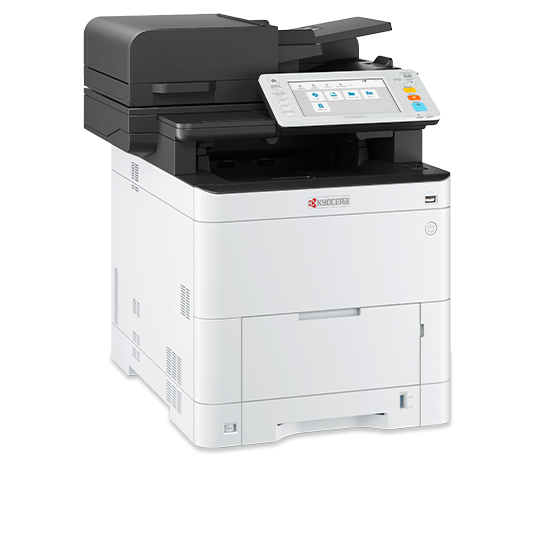
Bring proposals, presentations and reports to life, while handling everyday black-and-white work on the same device.
A dedicated choice for invoices, correspondence and text-heavy work. Colour scanning does not mean colour printing.
 A4 colour & mono printing
COLOUR FOR THE BUSY WORKGROUP
Keep reports, charts and customer documents in full colour, with output that keeps pace with a shared office. The MA4000cix combines A4 colour printing with copying and scanning in a compact multifunction format.
Kyocera ECOSYS MA4000cix. Manufacturer specifications ↗
A4 mono printing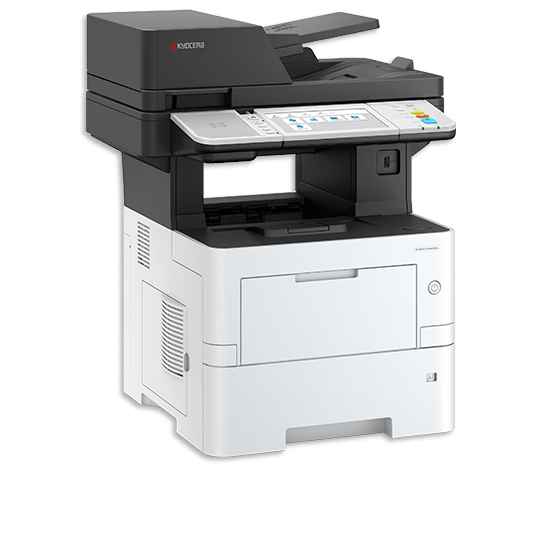
EVERYDAY BLACK & WHITE
A dedicated choice for text-heavy A4 work such as invoices, correspondence and internal documents. It prints in black and white and supports colour scanning—choose the MA4000cix when you also need colour output.
MA4500ix shown; optional accessories may be pictured. Manufacturer specifications ↗
Both models are supplied with installation and support options matched to your business.
A4 WORKGROUPS / MATCH THE OUTPUT
Choose the MA4000cix when your team needs colour printing. The MA4500ix is a dedicated mono alternative for predominantly text-based output. Both can form part of a supported business printing setup.
Reports, graphs and customer documents benefit from colour output. The MA4000cix prints up to 40 A4 pages per minute in colour or mono, with a single-pass duplex scanner for double-sided originals.
For invoices, correspondence and routine administrative work, the MA4500ix prints up to 45 A4 pages per minute in black and white. It can scan in colour, but does not print in colour.
We consider how many people share the printer, when jobs arrive, your colour mix and scanning needs. Paper handling and optional accessories are selected to suit the proposed configuration.
Share your current machine, approximate volumes and the problems you want to solve. We can compare equipment and support options, with costs and scope set out in your proposal.
HOW COPIER RENTAL WORKS
A fixed monthly rental covers the machine. A cost per copy covers what you print under your service agreement.
Our printer service agreements cover call-outs, labour, preventative maintenance and remote assistance.
| Consideration | Rent | Buy outright |
|---|---|---|
| Upfront cost | Spread the machine cost over monthly payments. | Pay for the machine upfront. |
| Maintenance | Pair your rental with a service agreement. | Arrange a separate service agreement or paid support. |
| Upgrades | Plan a review around your agreement and changing needs. | Choose when to replace or trade in the machine. |
| Cash flow | Predictable machine rental plus usage charges. | Larger initial payment, then running and service costs. |
| Tax treatment as a business expense | Ask your accountant how rental and service payments are treated for your agreement. | Ask your accountant how the asset and running costs are treated. |
| Ownership at the end | Depends on the agreement; ownership is not automatic. | You own the equipment after purchase. |
These are planning bands for your business, not manufacturer volume ratings. Your real print counts, peak periods and document sizes guide the final machine choice.
1–5 users · up to about 1,000 pages a month
Start with A4. Choose colour for customer-facing work or mono for mainly text.
6–20 users · about 1,000–5,000 pages a month
Consider a shared A4 multifunction printer, or A3 if you produce plans, larger sheets or booklets.
20+ users · over about 5,000 pages a month
Assess capacity, scanning and peak queues. Choose A3 where document size requires it and colour or mono to suit your output.
The ECOSYS MA4000cix prints both colour and mono.
No. The ECOSYS MA4500ix is a mono printer for black-and-white output.
Our featured Kyocera MA4000cix and MA4500ix are A4 multifunction machines.
Choose colour output, such as the MA4000cix, when graphics, branding and presentation documents matter.
Yes. Send a recent bill and approximate colour and mono volumes.
This range focuses on the featured A4 machines. For refurbished A3 options, explore our Olivetti page.
Printers, phones, CCTV, IT and fibre from one supplier. One contact. One support line.
Get a free cost comparisonPrices exclude VAT. Final pricing, availability and inclusions are confirmed in your written quote. T's & C's apply.